PIRL Experimental · Custom resource creation
Tell me what you need to teach.
I’ll build the resource to fit.
You know your students, your learning goals, and the part of tomorrow’s lesson that still needs to come together. Bring me that need. I’ll help turn it into a clear, useful resource designed around your classroom.
A reading at the right level. An assessment that gets at the thinking you care about. A notebook page with enough room to respond. Sometimes the resource you need is specific enough that searching for it takes longer than teaching with it should.
On this page
One classroom need. A resource that keeps developing.
From a hand drawing to a model students can investigate.
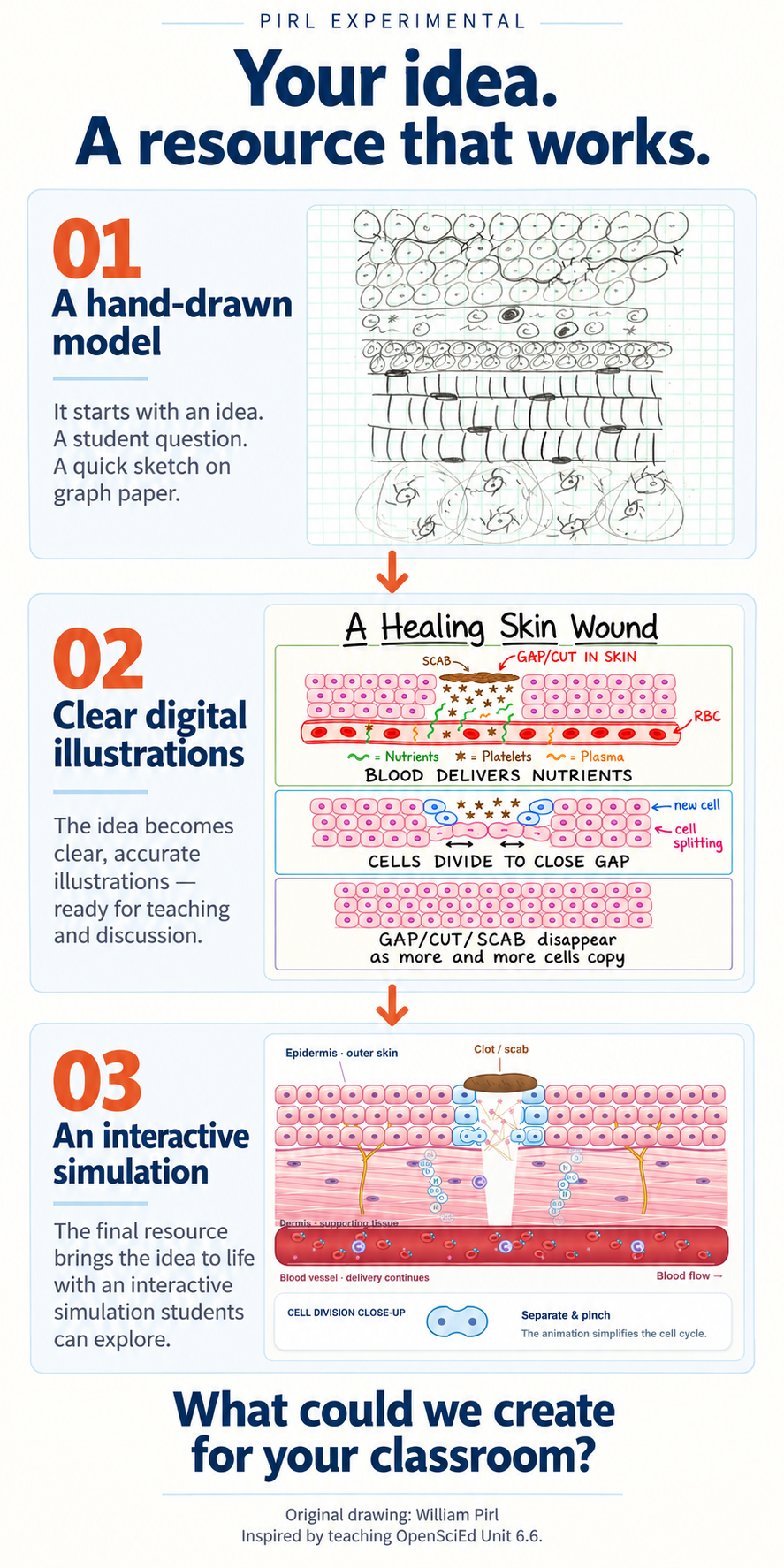
I wanted students to explain what happens beneath a healing cut: how a gap in tissue becomes filled with new cells. That need grew out of teaching OpenSciEd Unit 6.6. I started with my own hand-drawn tissue model, developed digital illustrations, and used those visuals as the starting point for an animated, interactive model.
Each version gives students another way into the same question. The drawing makes the structures visible. The digital sequence helps students compare stages. The simulation adds time and control: students can pause the process, watch cells grow and split, and investigate how changing the model’s conditions affects its progress.

Read the video’s story
The walkthrough begins with the pencil tissue drawing and then shows the digital illustrations and healing sequence. It moves into the running simulation, where a cut bleeds, a clot and scab form, cells grow and split, and the gap fills. A pause during cell division makes that change easier to examine. A comparison then shows the model under its default conditions and with less oxygen before returning to the invitation to describe a classroom need.
Students can use the full simulation to start and stop the process and change oxygen, nutrients, hydration, surface moisture, and infection settings, or model a setback from picking the scab. These are simplified classroom conditions for asking questions and comparing outcomes; the display does not predict an individual person’s healing time.
Read the teaching decisions behind the model
The resource is one part of a larger teaching story. In my Modifying OpenSciEd 6.6 series, Lessons 9 and 10 explain how I use cell-division evidence, adjust scaffolds, and help students carry an explanation of skin healing into other tissues and growth.
From Watching Cells Split to Explaining Healing
See how videos, a three-step model, labeling and captioning supports, and a visual card sort help students connect cell division to the injury gap—and why I am reconsidering how much of the modeling students can take on themselves.
From Cell Lifespans to Explaining Whole-Body Healing
Follow how a cell-lifespan infographic became the center of the lesson after assessment exposed a gap: students could explain skin healing but struggled to apply the mechanism more broadly. The redesign connects replacement, repair, and growth while asking what the evidence can support.
A teacher’s eye for the details
“Almost right” can still mean an evening of revisions.
You find something promising, but the reading is too dense, the directions need rewriting, or the page leaves no space for students to explain their thinking. By the time you adjust the layout, add a model, and create another version, you have practically made the resource yourself.
I’ve been making and adapting classroom materials throughout my teaching career. That work taught me to pay attention to the details that change how a lesson feels: what students see first, how many decisions a direction asks them to make, where a visual helps, and whether a question actually reveals understanding. Those are the decisions I bring to custom resource creation.
You bring the classroom context. I bring the design work, practical teaching experience, and modern creation tools to help shape it into something you can use. The learning goal guides the choices about wording, structure, visuals, and support.
Start with the teaching need
What would make your next lesson easier to teach?
Your request can be a clear specification or a rough description of what is not working yet. Here are some places we can start.
Handouts & notebook pages
Guided notes, graphic organizers, response pages, and lesson companions with purposeful layouts, clear directions, and space for student thinking.
Readings & scaffolds
Explanations, vocabulary supports, sentence starters, and differentiated versions that support access while keeping the intended learning in view.
Assessments & feedback tools
Exit tickets, quizzes, performance prompts, rubrics, and answer keys built around what you want students to demonstrate and what you need to learn from their responses.
Slides & lesson materials
A focused slide sequence, an activity guide, discussion prompts, or a set of materials that helps the parts of a lesson work together.
Visuals that explain
Custom diagrams, illustrations, reference sheets, and visual directions shaped around a particular concept, audience, or classroom task.
Interactive learning tools
Ideas for a simulation, digital activity, or interactive model. We’ll discuss the learning purpose, technical requirements, and what is feasible before defining the project.
From an idea to a usable resource
A straightforward process, with the details agreed up front.
Tell me what you need.
Share the grade, subject, learning goal, and what you want students to do. Include what has been difficult to find or make, and any examples that help show what you have in mind.
We agree on the project.
I’ll follow up about fit, format, scope, timing, and cost. We’ll also clarify the feedback and revision process before work begins, so you know what the project includes.
I build; you bring the classroom lens.
I create the agreed materials, and you review them with your students and teaching context in mind. We use the agreed feedback process to refine the resource and prepare the final files.
Get a feel for my approach
See how I think about materials, learning, and design.
These parts of my site show the thinking behind my work and the kinds of resources I build and adapt. They can also give us a starting point for discussing the style or support you want.
Creator tools
Explore tools and guides for creating classroom materials and making practical design decisions.
Curriculum in practice
Follow my Modifying OpenSciEd 6.6 series for examples of how I adapt instruction, notebook materials, and assessments around classroom needs.
Interactive resources
Visit the simulations collection to explore another way a learning goal can become something students investigate and use.
Try working together
Ask about a free first resource.
Have one specific classroom need you would like me to tackle? Send it my way and mention the first-resource offer. We’ll identify a manageable starting project so you can see how closely a custom resource can fit the way you teach.
I’ll confirm what is included and the timing before we begin. If your idea needs a larger project, we can discuss a smaller starting point and any paid work separately.
Your classroom is the starting point
Tell me what you wish you already had.
Use the form below to describe your custom resource request. A few sentences are enough to begin; you do not need a finished brief. The details below help me understand what would make the resource useful.
- Grade & subjectWho will use it, and what are they studying?
- Learning goalWhat should students understand or be able to do?
- Student needsReading level, vocabulary, scaffolds, or differentiated versions.
- Format & stylePrint or digital, layout preferences, visuals, and any editable-file needs.
- Starting materialsDescribe what you already have, or include a link to an example you can share.
- Timing & scopeWhen you hope to use it, the pieces you need, and any budget considerations.
If you are interested in the free first-resource offer, include that in your message. I’ll follow up to clarify the project and next steps.
A few questions you might have
Do you work across grades and subjects?
My deepest classroom experience is in middle school science, and I welcome requests across grades and subjects. Tell me about the content and audience so I can confirm whether I’m the right fit for your project.
Can you improve something I already have?
Yes—your starting point might be a rough draft, a resource you created, or materials you have permission to adapt. Tell me what works, what does not, and what you want students to be able to do with the revised version.
What does it cost, and how long does it take?
That depends on the resource, the number of versions, and the work involved. I’ll confirm scope, price, and timing before you commit to a paid project. Please include your hoped-for teaching date in your request.
Can I request a particular file format or visual style?
Absolutely. Tell me where and how you want to use the resource, whether you need to edit it later, and any layout or visual preferences. We’ll confirm the final format and what I can provide before starting.
How do you use AI in resource creation?
I use modern tools, including AI, to support the creation process. My teaching experience guides the learning goals, structure, wording, and review. The aim is a resource that makes sense for your students and the way you plan to teach it.
What Can I Create for You?